

The Schedule & delivery tab sets where the feed is pushed, how often it is built, which guardrails can hold a bad build, and who is told when something goes wrong.
Settings on this tab take effect when you publish. Before you publish, work through the Before you publish checklist.
Schedule & delivery tab #
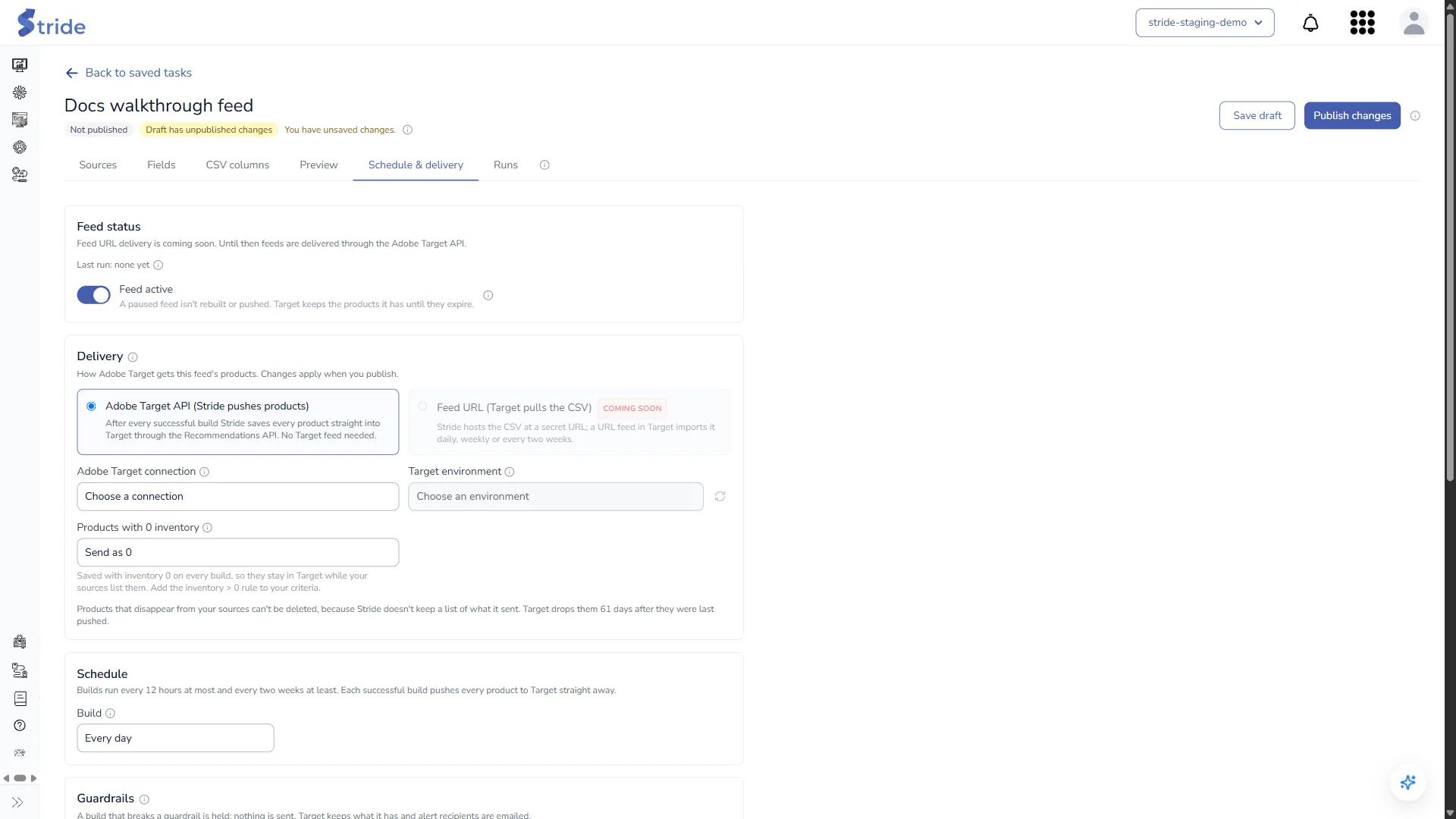
Feed status #
Turn the toggle off (Feed paused) to stop scheduled builds, or on (Feed active) to resume them. A paused feed isn’t rebuilt or pushed on its schedule, and Target keeps the products it has until they expire.
Note
Publishing, or clicking Run now, still builds and pushes a paused feed.
Delivery #
Stride pushes products through the Adobe Target API: after every successful build, it saves every product into Target through the Recommendations API. You don’t need a feed set up in Target.
- Adobe Target connection: the Adobe IO integration to push with.
- Target environment: the Recommendations environment to push to. Use the refresh button if a new environment doesn’t appear. You can’t publish until both the connection and the environment are chosen.
- Products with 0 inventory:
- Send as 0 (default): they stay in Target with inventory 0 while your sources list them. Add the inventory > 0 rule to your criteria.
- Delete from Target: they are removed from the catalogue.
- Don’t send: they are left out of the push, and stay in Target for up to 61 days.
Changes live systems
Delete from Target removes products from the live catalogue in the chosen environment on every build.
Note
Products that disappear from your sources are not deleted from Target, because Stride doesn’t keep a list of what it sent. Target drops them 61 days after they were last pushed.
Schedule #
Build: Manual only, Every 12 hours, Every day (default), Every week or Every two weeks. Each successful build pushes every product to Target straight away.
Guardrails #
A build that breaks a guardrail is held: nothing is sent, Target keeps what it has, and the alert recipients are emailed.
- Minimum products (default 1).
- Maximum drop vs. published (%) (default 30%).
- Maximum invalid rows (%) (default 5%).
File #
- Strict entity ids (on by default): drop rows whose ID contains characters Target doesn’t allow. When this is off, those characters are replaced with
-, and the IDs may then no longer match the ones your site sends. - Write a UTF-8 BOM (off by default): leave it off unless Target shows garbled characters.
Alerts #
In Email when a build is held or fails, enter the addresses to notify, separated by commas. They are emailed when a build is held or fails, or when a push fails or is only partly successful.
The tab ends with an Adobe Target checklist. The same checks are listed under Before you publish.


